
Categories
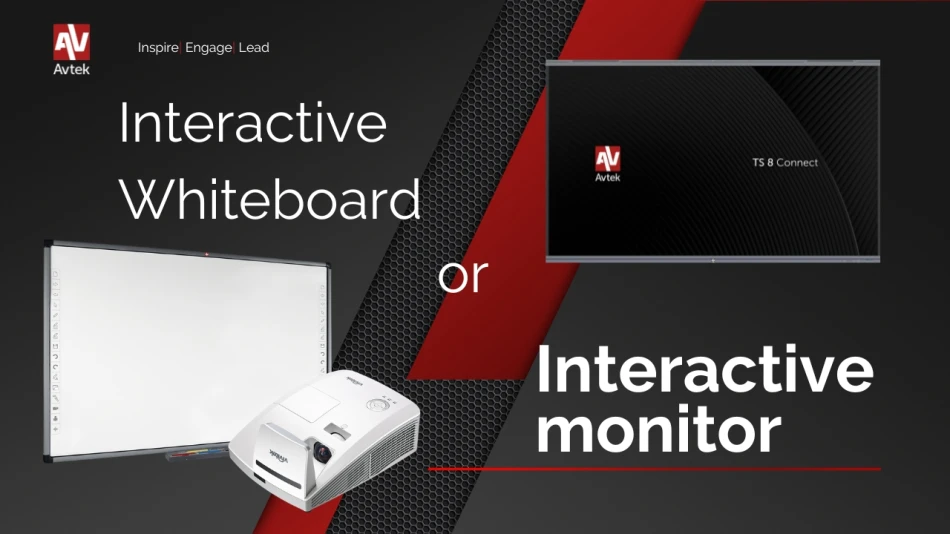
In an era of rapidly evolving educational technology, choosing between an interactive whiteboard and an interactive touch monitor has become a key issue for educational institutions. Both solutions offer unique features that can significantly support the teaching process. In this article, we will look at how each of these technologies works, their advantages and disadvantages, and who they are best suited for.
How does an interactive whiteboard work?
What is an interactive whiteboard?
An interactive whiteboard, also known as a multimedia whiteboard, is an educational device that combines the functionality of a traditional classroom whiteboard with computer-based interactivity. A board such as the Avtek TT-Board 80 allows images from a computer to be displayed using a projector. Users can write, draw, and operate any computer program using a special pen or even a finger.
What are the main functions of an interactive whiteboard?
An interactive whiteboard offers a wide range of possibilities. In addition to displaying content from a computer, it enables interactive work with educational applications thanks to advanced infrared or electromagnetic sensors. As a result, teachers and students can use multimedia resources such as videos, presentations, quizzes, and educational games. Technologies used in models such as the Avtek TT-Board 90 Pro also provide high image resolution, often reaching Full HD, which significantly improves the visual quality of the content being presented.
How does an interactive whiteboard work with a computer and a projector?
Interactive whiteboards operate in cooperation with a computer and a multimedia projector. The computer acts as the main operating centre, providing content to the projector, which then displays the image on the surface of the whiteboard. A board such as the Avtek TT-Board is equipped with a wall mount, allowing for both wall and ceiling installation, ensuring stability and ergonomics in use.
How is an interactive monitor different from a multimedia whiteboard?
What is an interactive monitor?
An interactive monitor is a modern device that, like an interactive whiteboard, supports active learning. However, unlike a whiteboard, it does not require a projector because it has its own built-in touchscreen. This technology, used in monitors such as those offered by Avtek, provides ultra-high 4K resolution, allowing content to be displayed with outstanding accuracy and detail.
What benefits does an interactive monitor offer compared with a multimedia whiteboard?
An interactive monitor offers a number of benefits that may exceed the capabilities of a traditional multimedia whiteboard. Thanks to its built-in software, it does not require additional equipment such as a projector, which simplifies both installation and use. These monitors often provide better image quality and are more intuitive to operate. In addition, interactive monitors offer features such as wireless collaboration with mobile devices, which makes it much easier to conduct lessons, presentations, or training sessions.
In what situations is a multimedia whiteboard the better choice?
Despite the many advantages of monitors, a multimedia whiteboard may be more suitable in situations where a larger working surface is important. In addition, interactive whiteboards may be preferred by schools that already have projectors and simply want to expand their capabilities with interactive features, without investing in new monitors.
How do you choose the right equipment for interactive teaching?
What are the key criteria when choosing an interactive whiteboard?
When choosing an interactive whiteboard, it is worth considering several key factors. The first is touch accuracy and responsiveness, which are important for user comfort. Compatibility with different types of educational software and the possibility of integrating the whiteboard with existing school systems are also important. Investing in models such as the Avtek TT-Board may be beneficial due to the features they offer and the assurance of quality.
What should you pay attention to when buying an interactive monitor?
When purchasing an interactive monitor, image quality is one of the most important criteria. Monitors with 4K resolution provide the highest level of detail. It is also worth checking whether the monitor supports wireless connections and whether it is equipped with the right ports, such as HDMI, USB-C, and DisplayPort. Additional features, such as a stylus or compatibility with wall mounts, should also be taken into account.
What software is needed to operate a multimedia whiteboard?
What software works with interactive whiteboards?
Interactive whiteboards require dedicated software that allows users to take full advantage of their capabilities. Such software often includes features that make it easier to create interactive presentations, such as Avtek Interactive Suite, which offers tools for managing multimedia and interactive content. This kind of solution is extremely valuable in education, allowing teachers to create engaging lessons.
What functions does software for multimedia whiteboards offer?
Professional software for multimedia whiteboards offers many features that enrich the learning process. Among other things, it enables the use of cloud storage for storing and sharing materials, which makes cooperation between teachers and students easier. It can also support advanced teaching tools, such as quizzes and online tests, making lessons more dynamic and interactive.
How do you install and configure software for multimedia whiteboards?
Installing and configuring software for multimedia whiteboards is usually a straightforward process, but it does require attention to detail. First of all, you should make sure that all hardware requirements are met. Then, once the software has been installed, the settings need to be configured according to the user’s needs and the manufacturer’s instructions. It is also worth updating the software regularly in order to benefit from the latest features and security improvements.
What are the latest technological solutions in education?
What are the advantages of wireless collaboration with an interactive whiteboard?
Wireless collaboration with an interactive whiteboard offers many advantages, above all eliminating problems related to cables and space limitations. Thanks to Wi-Fi technology, teachers can move freely around the classroom and conduct lessons using mobile devices. These solutions expand the possibilities for interaction and student engagement, which is especially important in dynamic learning environments.
How do interactive whiteboards for children support learning in preschool?
Interactive whiteboards for children are particularly useful in preschools, where education is based on play and creativity. These interactive devices allow children to engage with colourful and stimulating educational applications that develop their cognitive skills. As a result, learning becomes more attractive and motivating, which increases teaching effectiveness at this early stage of education.
Which technologies are best suited to teaching?
Modern educational technologies are diverse and tailored to different educational needs. Interactive whiteboards and monitors, as well as advanced educational software, are indispensable tools in modern educational institutions. These technologies support teaching by offering innovative methods that are more effective and flexible, while also promoting active learning through interactivity and collaboration.
Interactive monitor vs interactive whiteboard – key differences
Although both devices offer similar functions, an interactive monitor and an interactive whiteboard differ in terms of technology and user comfort. Touch monitors guarantee exceptionally high image quality thanks to Full HD or 4K resolution, while interactive whiteboards rely on a projector, which may result in poorer colour reproduction, especially in well-lit rooms.
In addition, monitors are more reliable – they do not require calibration or regular lamp replacement, which translates into lower operating costs. Their versatility lies in the ability to integrate with applications that work independently, without the need to connect an additional computer, which is often a challenge in the case of interactive whiteboards.